Heat Map Visibility Tracking in Tallahassee, Florida
See where visitors look, pause, and click so your website turns attention into action.
Take the Free 5-Prompt Test™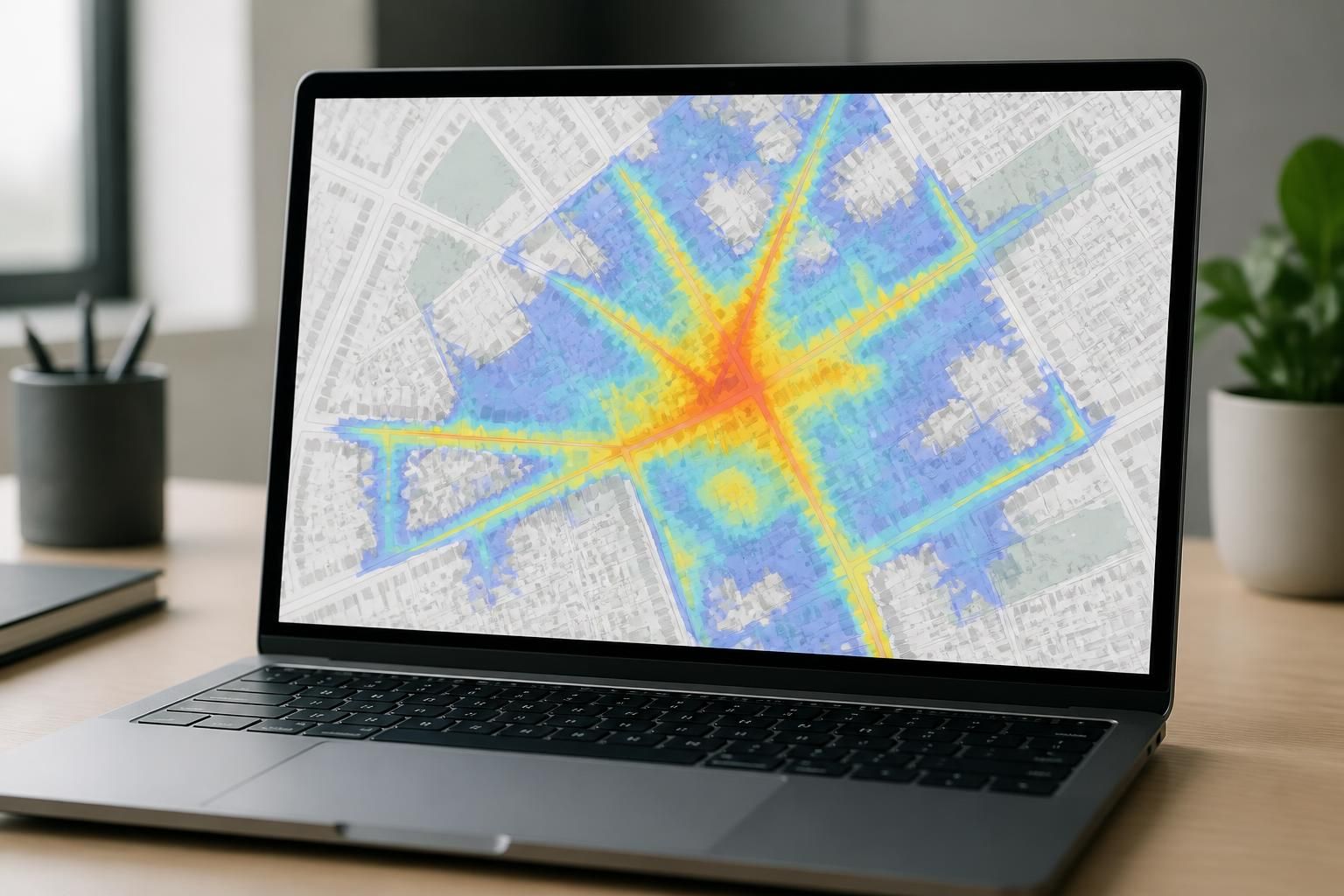
See where visitors look, pause, and click so your website turns attention into action.
Take the Free 5-Prompt Test™
If your website gets visits but those visitors do not seem to move, click, or call, the problem may not be traffic. It may be visibility. Heat map visibility tracking shows where people actually look, how far they scroll, and which parts of a page attract or lose attention.
Know What AI Sees LLC helps businesses in Tallahassee, FL turn that attention data into clear next steps. Instead of guessing why a page underperforms, we review what users appear to notice first, what they skip, and where the page should be adjusted so more of the right information gets seen.
Heat map visibility tracking gives you a visual record of user attention. It helps you understand whether important content is being seen at all, whether a button is getting enough focus, and whether visitors are spending time where the page needs it most.
We use that information to identify patterns such as:
This is especially useful when a page looks polished but still does not lead visitors toward a call, form, or booking step.
Many pages do not have a traffic problem. They have a visibility problem. Visitors arrive, glance, and leave without reaching the content you want them to see.
If the first screen gets views but the rest of the page goes untouched, the page may not be guiding people well. Heat map visibility tracking can show where that drop happens so we can adjust structure, spacing, and message order.
When services, proof points, or next-step buttons are placed too far down, many visitors never get there. This is common on mobile pages where screen space is limited and scrolling decisions happen quickly.
If visitors tap nearby items instead of the main button, the page may be competing with itself. That can point to crowded layouts, unclear labels, or content that pulls attention away from the action you want.
We keep the process practical and easy to review. The goal is not to overwhelm you with charts. The goal is to show where the page is getting noticed and where it is losing momentum.
We look at the layout, section order, call-to-action placement, and mobile presentation before interpreting the heat map data.
Heat map results show where users click, move, and scroll. That gives a clearer picture of what the page is communicating without relying on assumptions.
We compare the attention pattern against your business goal so we can see whether the page is guiding people toward the right action.
We translate the findings into layout and content adjustments you can actually use, whether the goal is more calls, more form fills, or better service-page engagement.
For businesses in Tallahassee, FL, this makes it easier to improve a page without rewriting everything from scratch.
Heat map visibility tracking works best when it is tied to a real page goal. We focus on what people see and how that affects action, not on vanity metrics alone.
If a page is meant to educate first and convert second, we track that pattern too. The goal is always to match the page structure to the job it is supposed to do.
Know What AI Sees LLC provides a clear readout of how a page is being seen, plus practical direction for what to change next. You are not left with raw heat maps and jargon.
Depending on the page and scope, your review can include:
This is useful for service pages, landing pages, and pages where the right message needs to appear before the visitor scrolls away.
Heat map visibility tracking often reveals the same few issues, even on well-designed sites. The issue is not always the offer. Sometimes the page simply does not make the offer easy to notice.
If a page contains several buttons, repeated links, and large blocks of text, visitors may not know where to look first. That can weaken the main message even when the content is strong.
Visitors may never reach the section that explains your actual service. If the opening view does not quickly establish relevance, the rest of the page may never get enough attention.
Many people view service pages on phones. If headings, spacing, and buttons are not built for quick scanning, attention may fall off faster than expected.
Once the heat map tells us where attention is going, we use that information to improve visibility rather than just decoration. Small changes can make a page easier to read and easier to act on.
Move the strongest message higher on the page so it is seen earlier.
Place buttons where visitors naturally pause, and make the next step obvious.
Remove or simplify elements that pull attention away from the main goal.
Break long sections into cleaner chunks so visitors can move through the page with less effort.
These changes help a page earn attention instead of hoping people will search for it.
It shows where visitors look, click, and scroll so you can see which parts of a page are getting attention and which parts are being skipped.
Yes. Mobile behavior often differs from desktop behavior, so heat maps can reveal whether key content is visible on smaller screens.
They do not explain every reason, but they can highlight the sections where attention drops or where visitors stop engaging.
Yes. Service pages depend on clarity, structure, and visible next steps, which makes heat map review especially practical.
No. Sometimes visibility improves with layout changes, section order adjustments, or clearer placement of a call to action.
Yes. It can be applied to a single page or multiple pages, depending on where you want to understand visitor attention.
If you want to know whether your content is being seen or skipped, heat map visibility tracking gives you a direct answer. For businesses in Tallahassee, FL, it is a practical way to turn page behavior into better decisions.
Ask Know What AI Sees LLC to review the page that matters most, then use the findings to make the next visit clearer, easier, and more likely to lead somewhere useful.
What We Stand For
We start with your business information, review how AI responds, and then show you where the message is clear, incomplete, or inconsistent so you can decide what to improve next.
We focus on what AI is actually saying and explain the meaning in plain language.
We connect the findings to website content, local visibility, and marketing decisions you can act on.
We avoid inflated promises and keep the results grounded in the source information AI is using.
FAQ
It generates five custom prompts based on your business name, category, and location so you can manually check how an AI platform responds. It is a self-check tool, not an official ranking.
No. Visitors run the prompts themselves in the AI platform they choose. The site provides the prompts, copy tools, scoring guidance, and space to save notes.
Each answer can earn points for being Seen, Suited, and Selected. The scoring is meant to show whether the business was identified, understood, and explicitly recommended.
Yes. The test is designed to stay email-free so visitors can check their visibility without creating a form submission just to use the tool.
Services include AI Marketing Audits, SEO Consulting, Analytics Reporting, AI Visibility Reports, Comprehensive Perception Audits, Google Business Profile Setup and Optimization, Ongoing Local Visibility Management, Heat Map Visibility Tracking, Citation Management, Website Design and Hosting, and the 5-Prompt Test.
The site is built for businesses that want to understand how AI finds, describes, compares, and recommends them, especially when that information affects search visibility and brand clarity.
No. It is a practical self-check that helps you understand what an AI platform says about your business and where the answer may be incomplete, inaccurate, or inconsistent.
Yes. The test includes options to print or save results so you can review them later, share them with your team, or use them as a reference when improving your content.

Enter your business name, category, and location to generate five prompts. Run them in your favorite AI tool - or try several to compare the answers. Save your notes, and get a clearer picture of how AI described your business.